Ordering for restaurants
More orders from every table.
Servana brings QR menus, kiosks, the counter and CRM together. Guests order from their phones, the kitchen gets the ticket without anyone rewriting it, and guests who visited once are invited back with points and vouchers.
Talk first. No form to fill in.
- No app to download
- Indonesian and English
- Works with common thermal printers
Where sales leak
Four sales leaks Servana closes
At lunch the floor staff are stretched. Guests wait to order, then order less or leave.
Guests don't wait to order
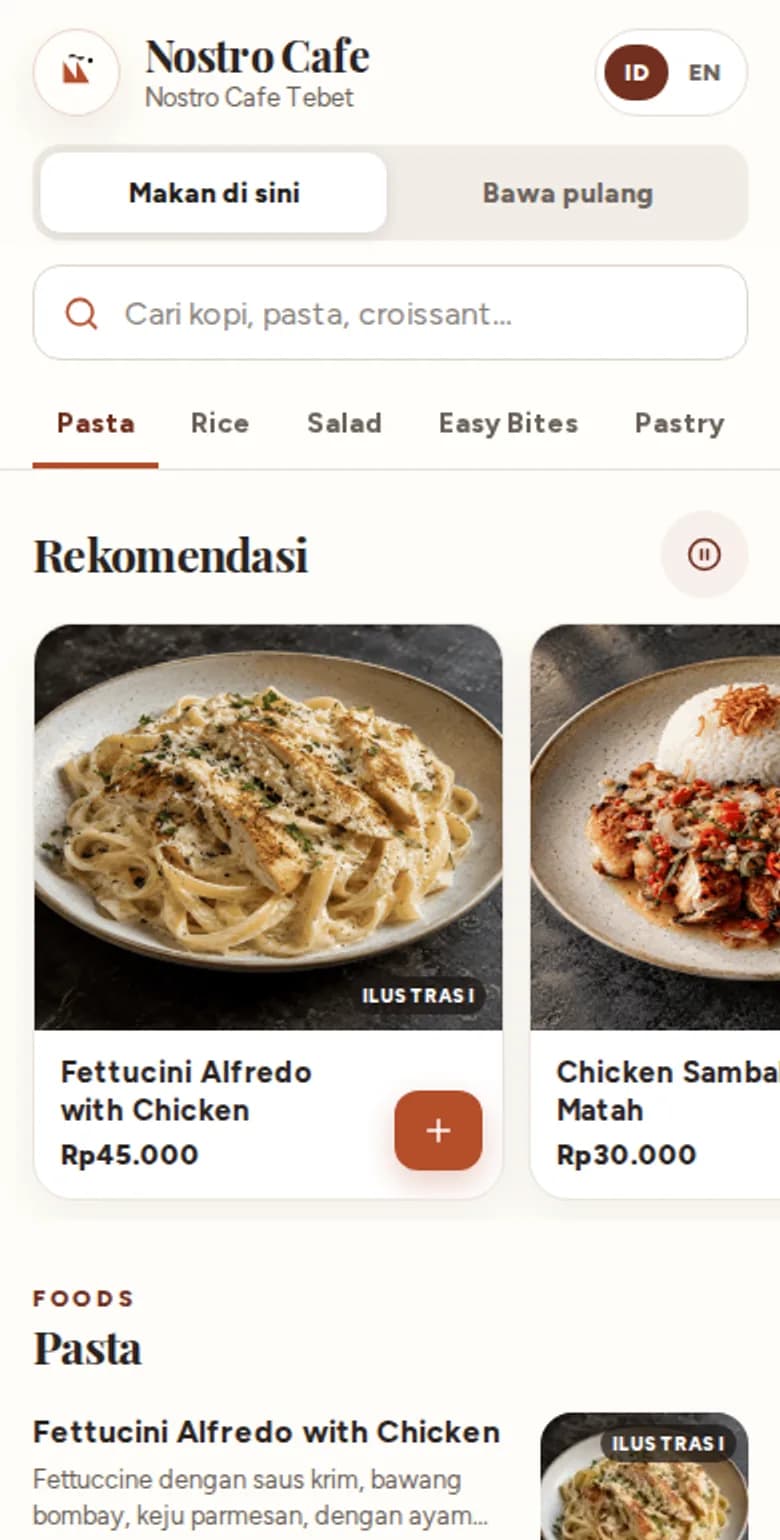
At busy times guests scan the QR code and order for themselves, then add more whenever they like without calling anyone over.
Busy staff forget to offer a drink, a larger size or a topping.
Every order can grow
Recommendations at the top of the menu, add-ons with clear prices and suggestions in the cart show dishes guests might have missed.
A guest comes once, enjoys it, and you have no way to invite them back.
Guests come back
Servana CRM recognises guests by phone number, gives points and tiers, and sends vouchers to guests who haven't been back in a while.
A dish turns out to be sold out after the guest has ordered, and they're let down before the food arrives.
The menu matches the kitchen
Sold-out dishes, opening hours and prices change in Servana Studio and apply at once on QR, kiosks and the counter. Guests don't order what isn't available.
One visit
From the table to the next visit
Five products
One system for the whole restaurant
Every product reads the same menu and store settings from Servana Studio. Start with one and add the others when you need them.
Servana Order
QR menus, table ordering, takeaway and e-menu
Guests don't wait for someone to bring a menu. They order as soon as they sit down, and can order again from the same table whenever they like.
Servana KioskComing soon
Self-order screens in store
Several guests order at once on several kiosks, while the cashier takes payments and hands over orders.
Servana Counter
Android cashier app with printing
QR orders appear in Counter as soon as they're placed, and kitchen tickets print without anyone pressing a button.
Servana Studio
Menu, stores, brand and staff in one place
Upload photos or a PDF of your current menu. AI reads it into a draft, and you check it before publishing.
Servana CRM
Members, points, vouchers and guest messages
Points and tiers give guests a reason to order from you again.
Built for restaurants in Indonesia
Your restaurant stays in front
Your brand, not ours
Your colours, logo, font and social links show on the guest menu, kiosks and receipts.
Money goes to your account
Online payments use the restaurant's own payment gateway account. Servana never holds your funds.
Rupiah and two languages
Prices and totals in rupiah, with tax and service charge calculated in the order your store chooses. Guests choose Indonesian or English.
Keep your POS
Servana is built to connect to the POS you already use, starting with ESB. Stores without a POS can use Servana Counter.
Getting started
Three steps to the first QR code on a table
Say hello
Say how many stores you have, how guests order today, and which POS you use.
See the demo
We walk through the flow on screen, then pick the products that suit your restaurant together.
Go live
Upload photos or a PDF of your menu to Servana Studio, check the draft, then print a QR code for every table.
Before you start
Common questions
Do guests need to download an app?
No. Servana Order runs in the phone's browser. Guests scan a QR code or open a link.
How do guests pay?
Each store chooses: pay at the counter, open bill, or pay online. Online payment through Midtrans (QRIS, e-wallets, virtual accounts) is being prepared.
We already use ESB POS. Does Servana work with it?
Yes. The menu is set in Servana Studio and sent to ESB, and paid orders go to ESB for the kitchen. This integration is being prepared with ESB.
Which printers work?
Servana Counter supports ESC/POS thermal printers over LAN, Bluetooth or USB, plus Epson, Star, Sunmi and iMin printers.
Can each branch have a different menu?
Yes. Menu, prices, opening hours and payment options are set per store.
What about guest data?
Guests are recognised by the phone number they give. Promotional messages go only to guests who agreed to receive them.
How much does it cost?
Book a demo, tell us how many stores and which products you need, and we'll send a quote.
Talk to us
Tell us about your restaurant. We'll show you where orders can grow.
Chat on WhatsApp straight away, or fill in this short form and your message is already written when WhatsApp opens.
- No account needed
- Ask for pricing for your number of stores